Agents and people, one workspace.Your code, your team and your agents in one shared project.
curl -fsSL https://logicpacks.io/install.sh | bashirm https://logicpacks.io/install.ps1 | iexDeveloped by TechRealm · Operated by Al Jash Trading · Free for individuals · How it compares

Work together.
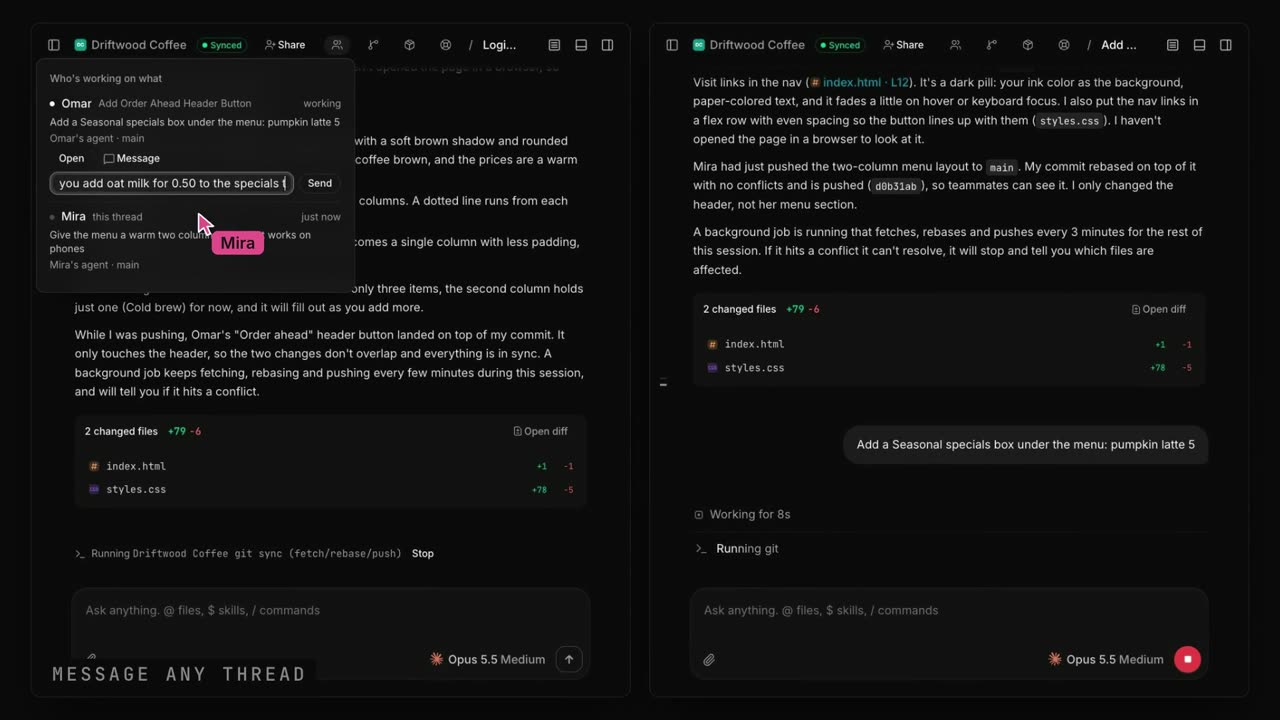
One shared project for the whole team. Everyone works with their own agent in their own thread, you see who is working on what, and agents can message each other.
Code with a friend: install the app (Mac or Windows), add a project, add your friend and share it. They connect to your laptop while it is on, and each of you works with your own Claude Code or Codex.
How it compares. Built only for people and agents working together.
vs Zed Delta, claude-duet
They share one Claude Code session. LogicPacks gives each person their own agent, with many agents in parallel that coordinate.
vs Cursor, Devin
Strong single-user agents. LogicPacks puts several people and their agents in one project, with goals and drift alerts (Beta).
vs Tuple, Parsec
Screen sharing without agents. LogicPacks shares the project, the threads and the agents.
vs Upwork
Hiring without the workspace. In LogicPacks a vetted freelancer joins the project with their own AI (Beta).
Beta
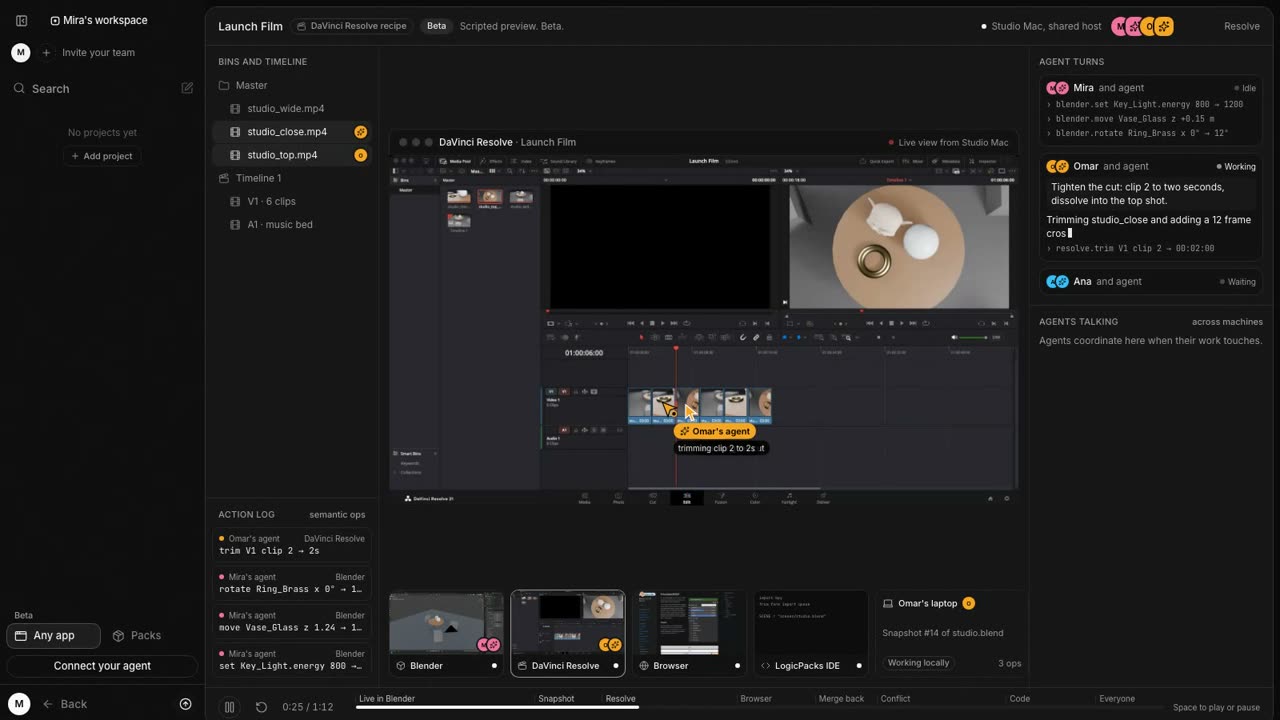
Every app, every agent, one machine. People and agents share the host’s apps, from Blender to DaVinci Resolve.
The same machine
Open the host’s apps with the same profiles. No VM.
A cursor for everyone
Live app views with a named cursor for each person and agent.
Snapshots that merge back
Work on a copy, then replay it as steps and settle conflicts.
A preview of a coming feature. Everything else on this page works without any access to your machine.
Beta
Delegate with guardrails.
Hand work to a teammate, or an outside team, as clear milestones with limits. Their agent stays on plan, and you see the moment anything drifts. Message them or watch, right there.
Or bring in a freelancer vetted by LogicPacks, with their own Claude and tools. How it works
Goal
Ship the new onboarding by Friday
- 01Sign-up flowOmar · Claude CodeDone
- 02Welcome emailMira · CodexOn plan
- 03Pricing pageSam · CursorDriftingAlso rewriting the nav
Works with your agent.
Use Claude Code, Codex, Cursor, VS Code and more, on your own subscription. Add a pack of your team’s know-how and any agent works your way, with no fine-tuning.
- Claude Code
- Codex
- OpenCode
- Gemini CLI
- Command Code
- Z.ai GLM
- Cursor
- VS Code Copilot
- Windsurf
- Cline
- Zed
- JetBrains
- Aider
- Amp
- Kiro
- Goose
- Qwen Code
- Warp
- Hermes
Paste this into your agent:
Set up LogicPacks for me: read https://logicpacks.io/setup.md and follow it.
1. If the LogicPacks app is missing, install it with one line, which also installs the lp helper: on macOS run curl -fsSL https://logicpacks.io/install.sh | bash in Terminal, on Windows run irm https://logicpacks.io/install.ps1 | iex in PowerShell.
2. Make sure Claude Code or Codex is installed and logged in in my terminal. If not, help me install it and log in.
3. Open this project in LogicPacks, then help me add my teammates.
Once the app is open, run lp login to connect the helper to it on this computer; there is no account. Do not send me to app.logicpacks.io: our cloud is coming soon.
Show me anything you would change on this machine and wait for my OK first.Where it runs.
Your own Claude Code or Codex on your machine works today. Our cloud is coming soon.
Your machine
Use the Claude Code or Codex you already have installed and logged in on your computer. We do not run anything for you, and your login stays on your machine.
Our cloudComing soon
A sandboxed cloud where each member gets an isolated user, and work keeps going when your laptop is off.